From Zero to Cloud MVP: How I Deployed OpenClaw on Azure

There has been a lot of talk about OpenClaw lately.
As an Azure Platform Engineer, I wanted to deploy it myself and understand what OpenClaw is about, why there is so much hype, and what the real security considerations look like in practice.
This walkthrough covers a GitOps-style deployment of an MVP-level architecture for a lab environment, using Azure Verified Modules (AVM) and GitHub Actions.
⚠️ Important: this is a lab/MVP deployment for learning and experimentation, not a production reference architecture. In my lab setup, I restricted inbound access to a single trusted source IP using Container Apps ingress access restrictions (firewall behavior).
What is OpenClaw
 |
|---|
| Openclaw |
OpenClaw (formerly ClawdBot/MoltBot) is an open-source autonomous AI agent that can run locally or remotely and automate tasks across apps, files, and the web.
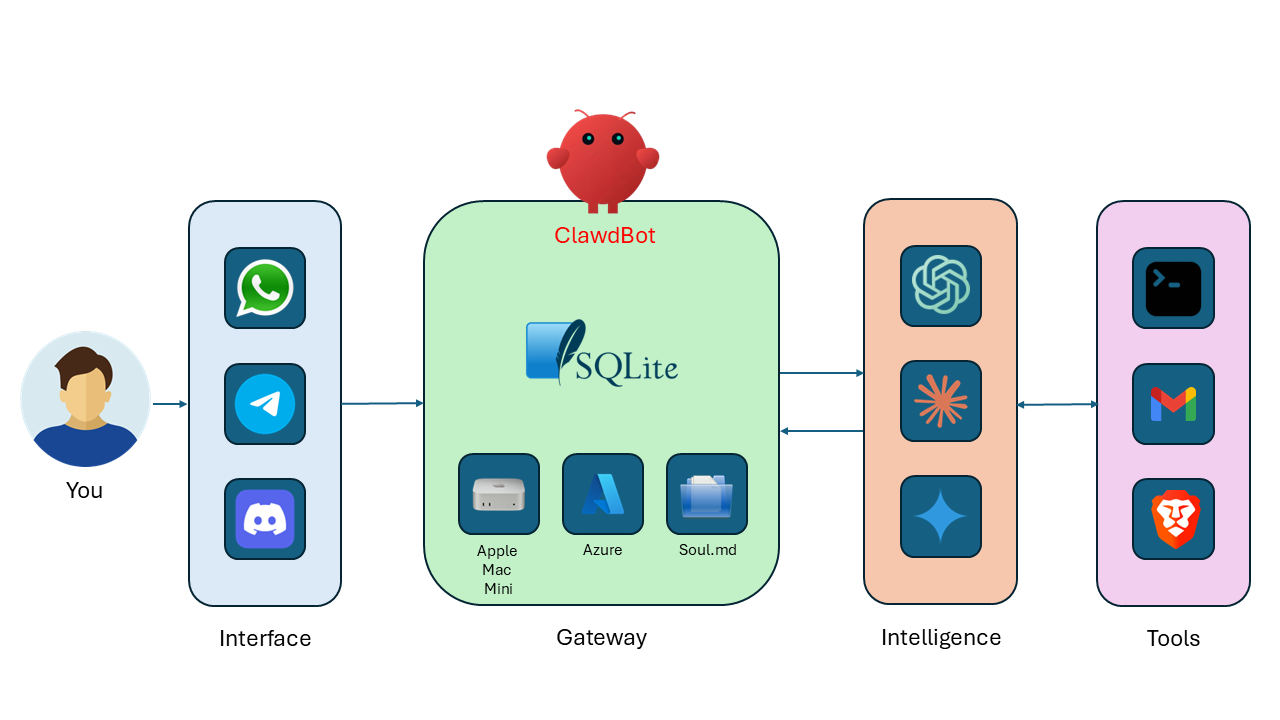
At a high level, OpenClaw is a gateway pattern that sits between your user interfaces and AI providers/tools.
How it hangs together:
Interface: where you interact (for example WhatsApp, Telegram, Discord, web UI).Gateway: the OpenClaw runtime ("ClawdBot"), where state, plugins, channel routing, policy, and memory/context are managed.Intelligence: model providers that handle reasoning/generation.Tools: external systems OpenClaw can call (shell, email, browser, and others) to perform actions.
The key design idea is separation of concerns: channels and tool orchestration stay in the gateway, while model inference stays with the LLM provider.
Request lifecycle (simple view):
- You send a message from a channel (for example Telegram or web UI).
- OpenClaw gateway receives it, applies routing/policy, and builds context.
- Gateway calls the selected model provider for reasoning.
- If needed, the gateway invokes tools (shell, email, browser, etc.).
- Gateway returns the final response back to your channel.
What I Built in this MVP deployment
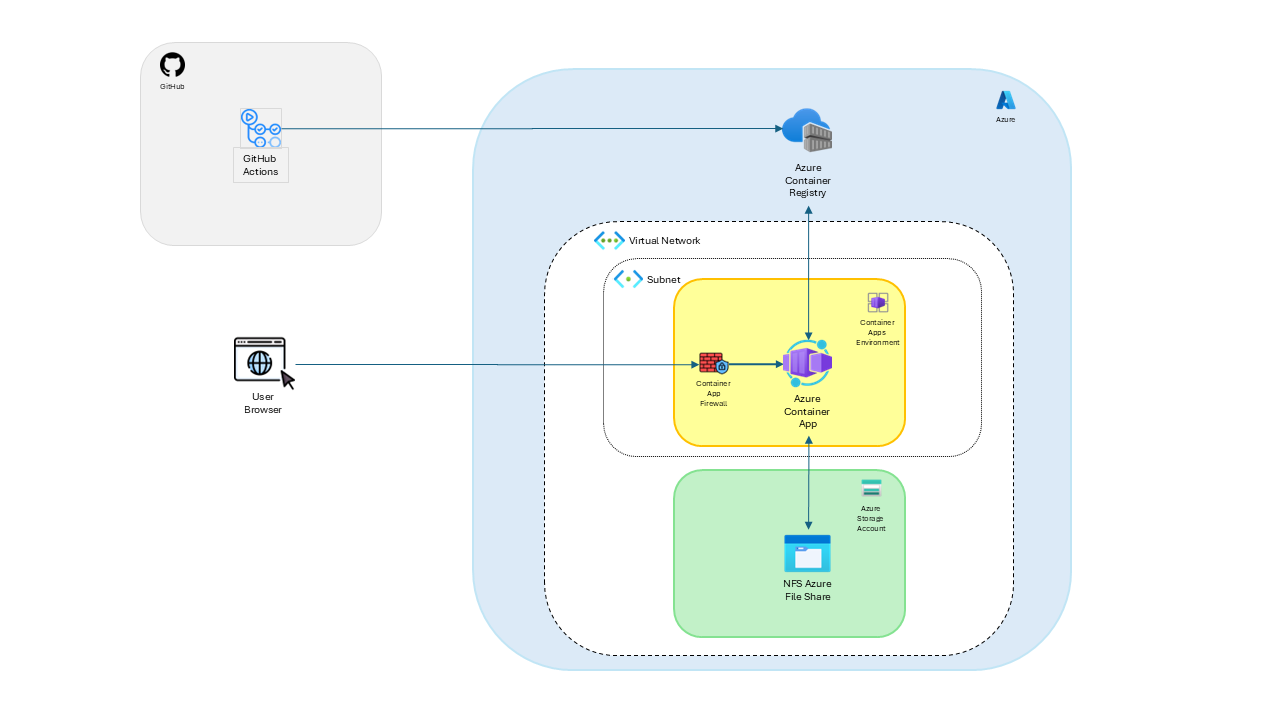
The MVP stack includes:
- GitHub repository with CI/CD workflows.
- Infrastructure as Code using Bicep with Azure Verified Modules (AVM).
- Azure Container Apps for the OpenClaw gateway runtime.
- Azure Container Registry (ACR) for images.
- Azure Storage for persistence.
- Custom VNet and Azure Files NFS for POSIX-compatible gateway state.
- Secret wiring for gateway token and optional LLM API key.
 |
|---|
| Openclaw Azure MVP Architecture |
At a high level, CI validates and builds. CD logs into Azure with OIDC, bootstraps required infra, pushes the image, and deploys the app revision.
Why I Took an MVP-First Approach
When you are learning a new platform pattern, over-engineering too early usually slows everything down.
For this OpenClaw build, I focused on:
- Shipping a working deployment path end to end.
- Keeping costs and moving parts under control.
- Designing with clear upgrade points for security.
This approach gave me fast feedback and made each failure useful instead of expensive.
Lab Scope and Guardrails
To keep this project practical and safe for experimentation, I used explicit constraints:
- Lab-only design target (not production hardened).
- Minimal but real CI/CD path with repeatable deployments.
- Scoped RBAC at resource-group level for the deployment identity.
- Ingress locked down to one trusted source IP in the Container App firewall rules.
If you copy this pattern, treat it as a foundation you harden iteratively.
AVM-First IaC Approach
For this lab, I intentionally used Azure Verified Modules (AVM) for the core platform resources so the deployment stays aligned with Microsoft-maintained module patterns.
- AVM for Azure Container Registry.
- AVM for Azure Storage account resources.
- Custom Bicep module only where explicit control was needed for Container Apps environment/app wiring and Azure Files NFS mount behavior.
That gave me a good balance between standardization (AVM) and practical control for OpenClaw-specific runtime needs.
Architecture at a Glance
Deployment Flow
High-Level Guide: Deploy OpenClaw on Azure with GitHub
This is the exact flow I used for the MVP deployment.
Prerequisites
Before you start, make sure you have:
- An Azure subscription (for me: MSDN sandbox/lab subscription).
- A pre-created Azure resource group in your target region.
- A GitHub repository with Actions enabled.
- A Microsoft Entra app registration configured for GitHub OIDC federation.
- RG-scoped RBAC assigned to that deployment identity (Contributor for MVP lab flow).
- Dockerfile for your gateway container image.
- Bicep IaC for base infrastructure and app deployment.
- GitHub secrets configured:
AZURE_CLIENT_IDAZURE_TENANT_IDAZURE_SUBSCRIPTION_IDAZURE_RESOURCE_GROUPGATEWAY_TOKENGEMINI_API_KEY(optional)
1. Prepare your Azure and GitHub foundations
- Create a resource group in your target region.
- Create or use an existing GitHub repo for your OpenClaw deployment.
- Configure OIDC federation between GitHub Actions and Azure.
- Assign least-privilege RBAC to your deployment identity at resource-group scope.
Why this matters:
- OIDC removes the need for long-lived cloud credentials in GitHub secrets.
- RG-scoped RBAC reduces blast radius while still enabling delivery.
2. Define infrastructure with Bicep
Model your baseline platform in infra/:
- ACR for image storage.
- Storage account(s) for persistence.
- Container Apps Environment and Container App.
- Custom VNet/subnet and NFS storage integration for gateway state.
- Secret references for runtime configuration.
In this implementation, core resources are deployed via AVM modules, with focused custom Bicep for the Container Apps + NFS integration path.
3. Build CI for fast validation
Your CI should:
- Validate Bicep compiles cleanly.
- Build the container image without pushing.
- Fail quickly if infra or Docker changes break.
This catches structural issues before deployment time.
Example CI pattern I used:
name: ci

on:
  pull_request:
  push:
    branches:
      - main

jobs:
  validate-infra:
    runs-on: ubuntu-latest
    steps:
      - uses: actions/checkout@v4
      - run: |
          az bicep install
          az bicep build --file infra/main.bicep

  build-image:
    needs: validate-infra
    runs-on: ubuntu-latest
    steps:
      - uses: actions/checkout@v4
      - uses: docker/setup-buildx-action@v3
      - uses: docker/build-push-action@v6
        with:
          context: app/openclaw
          file: app/openclaw/Dockerfile
          push: false
4. Build CD for deterministic delivery
Your CD should:
- Log into Azure with OIDC.
- Confirm the target resource group exists.
- Run bootstrap deployment (ACR + storage + networking prerequisites).
- Build and push the image to ACR.
- Run full Bicep deployment for ACA + mounts + secrets.
This gives you a predictable, rerunnable pipeline.
Example CD pattern I used:
- name: Azure login (OIDC)
  uses: azure/login@v2
  with:
    client-id: ${{ secrets.AZURE_CLIENT_ID }}
    tenant-id: ${{ secrets.AZURE_TENANT_ID }}
    subscription-id: ${{ secrets.AZURE_SUBSCRIPTION_ID }}

- name: Bootstrap infra (ACR + Storage)
  run: |
    az deployment group create \
      --name "mvp1-bootstrap-${{ github.run_number }}" \
      --resource-group "${{ secrets.AZURE_RESOURCE_GROUP }}" \
      --template-file infra/main.bicep \
      --parameters infra/params/mvp1.bicepparam \
      --parameters deployGateway=false

- name: Deploy full MVP1 (Gateway + mount + secrets)
  run: |
    az deployment group create \
      --name "mvp1-${{ github.run_number }}" \
      --resource-group "${{ secrets.AZURE_RESOURCE_GROUP }}" \
      --template-file infra/main.bicep \
      --parameters infra/params/mvp1.bicepparam \
      --parameters deployGateway=true
5. Configure required GitHub secrets
At minimum:
AZURE_CLIENT_IDAZURE_TENANT_IDAZURE_SUBSCRIPTION_IDAZURE_RESOURCE_GROUPGATEWAY_TOKENGEMINI_API_KEY(optional)
Optional variable:
AZURE_LOCATION(defaults toeastusin this implementation)
6. Apply a simple lab firewall guardrail
For my lab, I restricted ingress to a single trusted source IP in Container Apps.
High-level shape of the rule:
configuration: {
  ingress: {
    external: true
    targetPort: containerPort
    allowInsecure: false
    ipSecurityRestrictions: [
      {
        name: 'allow-my-ip'
        action: 'Allow'
        ipAddressRange: '<your-public-ip>/32'
      }
    ]
  }
}
This does not make the deployment production-grade, but it is a solid guardrail for lab exposure.
 |
|---|
| OpenClaw Gateway Dashboard |
Post-Deployment Operations Runbook
Once the gateway is deployed, these are the main commands I used to manage it. This section is intentionally practical so you can replicate the same flow.
Set shared variables
RG="rg-openclaw-mvp1"
APP="openclawmvp1-gateway"
export OPENCLAW_GATEWAY_TOKEN="<your-gateway-token>"
Three ways to interact with the remote gateway
- Azure CLI remote exec against the container.
- Interactive shell session inside the container.
- Local OpenClaw CLI in gateway-call mode.
# 1) Direct remote command via Azure CLI
az containerapp exec -g "$RG" -n "$APP" \
  --command "node /app/openclaw.mjs devices list \
  --url ws://127.0.0.1:3000 \
  --token ${OPENCLAW_GATEWAY_TOKEN}"

# 2) Interactive shell in the running container
az containerapp exec -g "$RG" -n "$APP" --command "sh"
# Example command inside container shell
node /app/openclaw.mjs plugins enable telegram

# 3) Local CLI call to remote gateway API
openclaw gateway call config.get --params '{}'
ℹ️ Most
openclawCLI commands update local config by default. To change remote config, useopenclaw gateway call ....
Pairing
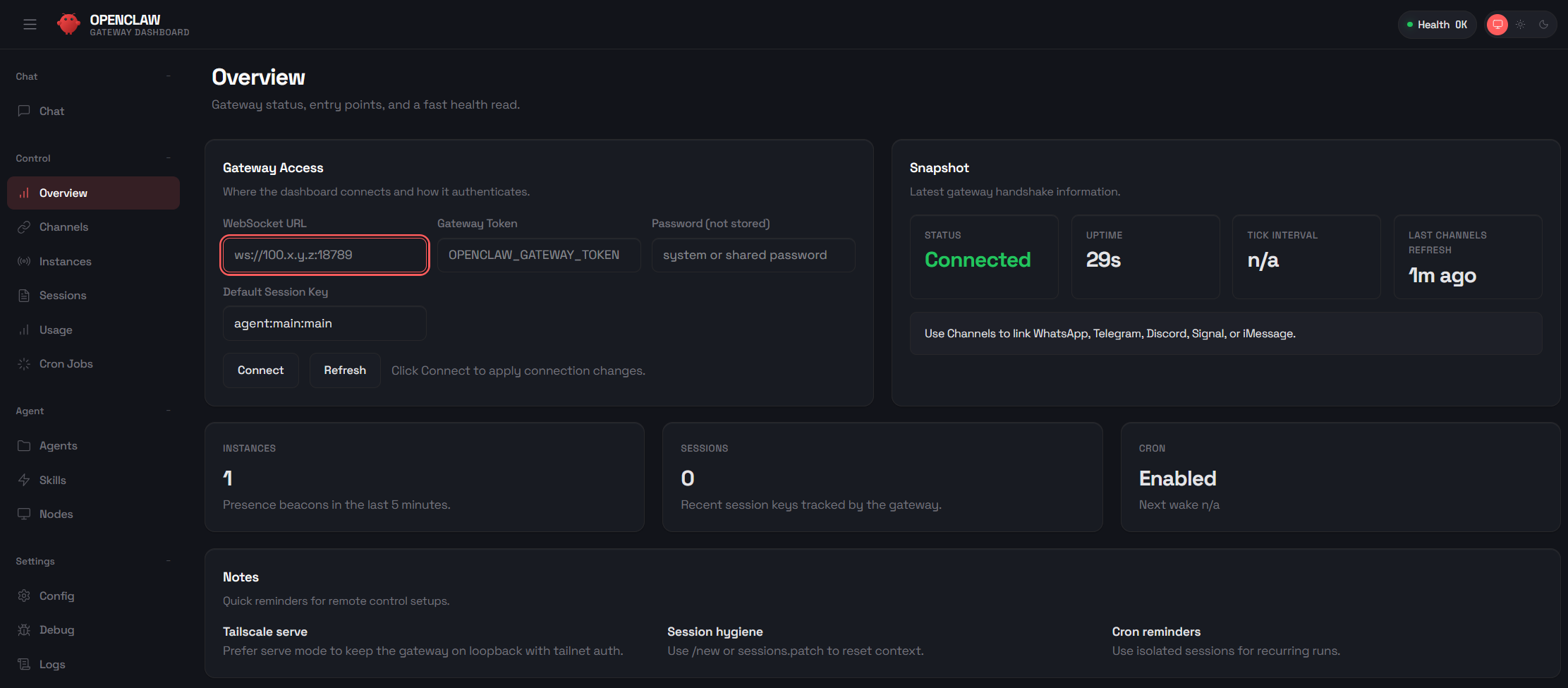
- Open the OpenClaw dashboard.
- Set the gateway token in the Overview page.
- Click Connect to create a pending request.
- Approve the request from CLI:
# List pending devices
az containerapp exec -g "$RG" -n "$APP" \
  --command "node /app/openclaw.mjs devices list \
  --url ws://127.0.0.1:3000 \
  --token ${OPENCLAW_GATEWAY_TOKEN}"

# Approve a specific requestId from the output
az containerapp exec -g "$RG" -n "$APP" \
  --command "node /app/openclaw.mjs devices approve <request-id> \
  --url ws://127.0.0.1:3000 \
  --token ${OPENCLAW_GATEWAY_TOKEN}"
Then refresh the dashboard.
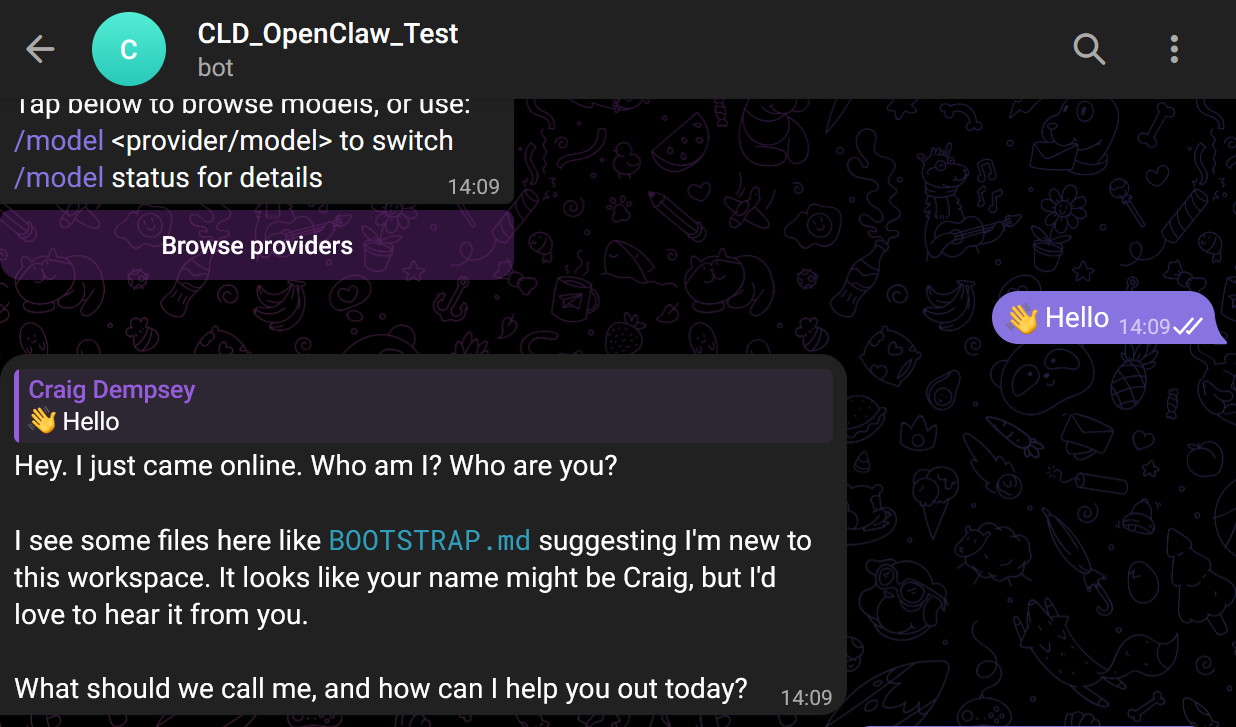
Telegram plugin and channel setup
# Enable plugin in the remote gateway
az containerapp exec -g "$RG" -n "$APP" \
  --command "node /app/openclaw.mjs plugins enable telegram"

# Add Telegram channel (use your bot token)
az containerapp exec -g "$RG" -n "$APP" \
  --command "node /app/openclaw.mjs channels add \
  --channel telegram \
  --token <telegram-bot-token>"

# Approve pairing for Telegram
az containerapp exec -g "$RG" -n "$APP" \
  --command "node /app/openclaw.mjs pairing approve telegram \
  --url ws://127.0.0.1:3000 \
  --token ${OPENCLAW_GATEWAY_TOKEN}"

# Check channel/plugin status
az containerapp exec -g "$RG" -n "$APP" \
  --command "node /app/openclaw.mjs channels status \
  --url ws://127.0.0.1:3000 \
  --token ${OPENCLAW_GATEWAY_TOKEN}"
⚠️ Never commit real bot tokens, API keys, or gateway tokens to source control. Use placeholders in docs and secrets in pipelines.
 |
|---|
| Telegram Bot |
Change model provider to Gemini
# Set model
az containerapp exec -g "$RG" -n "$APP" \
  --command "node /app/openclaw.mjs models set google/gemini-3-pro-preview"

# Check model status
az containerapp exec -g "$RG" -n "$APP" \
  --command "node /app/openclaw.mjs models status"
Check runtime logs quickly
# Revisions
az containerapp revision list -g "$RG" -n "$APP" \
  --query "[].{name:name,active:properties.active,traffic:properties.trafficWeight,\
health:properties.healthState,created:properties.createdTime}" \
  -o table

# Stream console logs
az containerapp logs show -g "$RG" -n "$APP" --type console --follow --tail 200

# Filter likely error lines
az containerapp logs show -g "$RG" -n "$APP" --type console --tail 300 | \
  grep -Ei "error|fail|anthropic|gemini|api key|auth|timeout|empty|diagnostic"
Optional local environment setup
If you want to manage the remote gateway from your laptop:
npm install -g openclaw
chmod 600 "$HOME/.openclaw/openclaw.json"
chmod 700 "$HOME/.openclaw"
Real Challenges I Hit (and What Fixed Them)
This was the most valuable part of the project.
1) Health probes and startup behavior
Symptom: Container started but readiness/liveness checks were mismatched.
Fix: Align startup behavior, exposed port, and probes in Container Apps definition.
Takeaway: Health probes are part of your app contract, not "just infra settings."
2) SMB permission failures (EPERM on chmod)
Symptom: OpenClaw failed on secure file writes under
/home/node/.openclaw, with errors like
EPERM: operation not permitted, chmod ....
Root cause: SMB mount semantics in this setup did not allow required POSIX-style permission changes.
Fix: Moved state persistence to Azure Files NFS on a custom VNet-integrated ACA environment.
Takeaway: Storage protocol choice can directly impact runtime behavior. If the app expects POSIX semantics, validate that early.
3) Docker build context misses
Symptom: CI builds failed due to missing files in context.
Fix: Cleaned Docker context assumptions and validated build path in CI.
Takeaway: Keep Dockerfile paths and workflow working directories explicit.
4) OIDC + RBAC scope drift
Symptom: Intermittent auth/authorization failures in deployment workflow.
Fix: Tightened identity scope and role assignments to expected target resources.
Takeaway: Federated auth is excellent, but only when scopes and role boundaries are treated as first-class configuration.
Security Roadmap from Here
MVP does not mean "ignore security." It means sequence security improvements deliberately.
Phase 1: MVP (current)
- Public endpoint with lab firewall restriction to one trusted IP.
- Working CI/CD automation.
- OIDC login and scoped deployment identity.
Phase 2: Security-conscious hardening
- Managed identity for workload auth.
- Key Vault integration for secret management.
- Improved observability and tighter network controls.
Phase 3: Production security posture
- Private networking patterns.
- Controlled egress strategy.
- Image scanning/signing.
- Stronger policy enforcement and governance controls.
Reproducibility Appendix (Full Files)
Because this project repo is private, I am including the full pipeline and IaC files here so you can reproduce the setup without needing repository access.
ℹ️ These are lab-ready reference files. Keep all secrets in GitHub Secrets or Azure secure stores, not in source.
.github/workflows/ci.yml
name: ci

on:
  pull_request:
  push:
    branches:
      - main

permissions:
  contents: read

jobs:
  validate-infra:
    runs-on: ubuntu-latest
    steps:
      - name: Checkout
        uses: actions/checkout@v4

      - name: Install Bicep CLI
        run: |
          az bicep install
          az bicep version

      - name: Build Bicep
        run: az bicep build --file infra/main.bicep

  build-image:
    needs: validate-infra
    runs-on: ubuntu-latest
    steps:
      - name: Checkout
        uses: actions/checkout@v4

      - name: Set up Docker Buildx
        uses: docker/setup-buildx-action@v3

      - name: Build image (no push in CI)
        uses: docker/build-push-action@v6
        with:
          context: app/openclaw
          file: app/openclaw/Dockerfile
          push: false
          tags: openclaw-gateway:ci-${{ github.sha }}
.github/workflows/cd.yml
name: cd

on:
  workflow_dispatch:
  workflow_run:
    workflows:
      - ci
    types:
      - completed
    branches:
      - main

permissions:
  id-token: write
  contents: read

env:
  IMAGE_REPOSITORY: openclaw-gateway

jobs:
  deploy:
    if: ${{ github.event_name == 'workflow_dispatch' || github.event.workflow_run.conclusion == 'success' }}
    runs-on: ubuntu-latest
    steps:
      - name: Resolve source SHA
        id: source
        run: echo "sha=${{ github.event_name == 'workflow_run' && github.event.workflow_run.head_sha || github.sha }}" >> "$GITHUB_OUTPUT"

      - name: Checkout (manual run)
        if: ${{ github.event_name == 'workflow_dispatch' }}
        uses: actions/checkout@v4

      - name: Checkout (from CI workflow run SHA)
        if: ${{ github.event_name == 'workflow_run' }}
        uses: actions/checkout@v4
        with:
          ref: ${{ steps.source.outputs.sha }}

      - name: Azure login (OIDC)
        uses: azure/login@v2
        with:
          client-id: ${{ secrets.AZURE_CLIENT_ID }}
          tenant-id: ${{ secrets.AZURE_TENANT_ID }}
          subscription-id: ${{ secrets.AZURE_SUBSCRIPTION_ID }}

      - name: Install Bicep CLI
        run: |
          az bicep install
          az bicep version

      - name: Validate deployment resource group exists
        run: |
          RG_NAME="${{ secrets.AZURE_RESOURCE_GROUP }}"
          if ! az group show --name "$RG_NAME" --query "name" -o tsv >/dev/null 2>&1; then
            echo "Resource group '$RG_NAME' was not found."
            echo "Bootstrap it first with a privileged identity, then grant this GitHub SPN RG-scoped Contributor."
            exit 1
          fi

      - name: Bootstrap infra (ACR + Storage)
        run: |
          az deployment group create \
            --name "mvp1-bootstrap-${{ github.run_number }}" \
            --resource-group "${{ secrets.AZURE_RESOURCE_GROUP }}" \
            --template-file infra/main.bicep \
            --parameters infra/params/mvp1.bicepparam \
            --parameters deployGateway=false

      - name: Resolve ACR login server
        id: acr
        run: |
          ACR_NAME=$(az deployment group show \
            --name "mvp1-bootstrap-${{ github.run_number }}" \
            --resource-group "${{ secrets.AZURE_RESOURCE_GROUP }}" \
            --query "properties.outputs.acrName.value" -o tsv)

          ACR_LOGIN_SERVER=$(az deployment group show \
            --name "mvp1-bootstrap-${{ github.run_number }}" \
            --resource-group "${{ secrets.AZURE_RESOURCE_GROUP }}" \
            --query "properties.outputs.acrLoginServer.value" -o tsv)

          echo "acr_name=$ACR_NAME" >> "$GITHUB_OUTPUT"
          echo "acr_login_server=$ACR_LOGIN_SERVER" >> "$GITHUB_OUTPUT"

      - name: Login to ACR
        run: az acr login --name "${{ steps.acr.outputs.acr_name }}"

      - name: Set up Docker Buildx
        uses: docker/setup-buildx-action@v3

      - name: Build and push image to ACR
        uses: docker/build-push-action@v6
        with:
          context: app/openclaw
          file: app/openclaw/Dockerfile
          push: true
          tags: |
            ${{ steps.acr.outputs.acr_login_server }}/${{ env.IMAGE_REPOSITORY }}:${{ steps.source.outputs.sha }}
            ${{ steps.acr.outputs.acr_login_server }}/${{ env.IMAGE_REPOSITORY }}:latest

      - name: Deploy full MVP1 (Gateway + mount + secrets)
        env:
          GEMINI_API_KEY: ${{ secrets.GEMINI_API_KEY }}
          GATEWAY_TOKEN: ${{ secrets.GATEWAY_TOKEN }}
        run: |
          if [ -z "$GATEWAY_TOKEN" ]; then
            echo "GATEWAY_TOKEN secret is empty or not set."
            echo "Set repository secret GATEWAY_TOKEN before deploying."
            exit 1
          fi

          az deployment group create \
            --name "mvp1-${{ github.run_number }}" \
            --resource-group "${{ secrets.AZURE_RESOURCE_GROUP }}" \
            --template-file infra/main.bicep \
            --parameters infra/params/mvp1.bicepparam \
            --parameters deployGateway=true \
            --parameters containerImage="${{ steps.acr.outputs.acr_login_server }}/${{ env.IMAGE_REPOSITORY }}:${{ steps.source.outputs.sha }}" \
            --parameters geminiApiKey="$GEMINI_API_KEY" \
            --parameters gatewayToken="$GATEWAY_TOKEN"

      - name: Verify gateway auth wiring in Container App
        run: |
          DEPLOYMENT_NAME="mvp1-${{ github.run_number }}"
          RESOURCE_GROUP="${{ secrets.AZURE_RESOURCE_GROUP }}"

          GATEWAY_NAME=$(az deployment group show \
            --name "$DEPLOYMENT_NAME" \
            --resource-group "$RESOURCE_GROUP" \
            --query "properties.outputs.gatewayName.value" -o tsv)

          if [ -z "$GATEWAY_NAME" ]; then
            echo "Unable to resolve gateway app name from deployment outputs."
            exit 1
          fi

          SECRET_REF=$(az containerapp show \
            --name "$GATEWAY_NAME" \
            --resource-group "$RESOURCE_GROUP" \
            --query "properties.template.containers[0].env[?name=='OPENCLAW_GATEWAY_TOKEN'].secretRef | [0]" \
            -o tsv)

          if [ "$SECRET_REF" != "gateway-token" ]; then
            echo "OPENCLAW_GATEWAY_TOKEN env var is not mapped to expected secretRef gateway-token."
            echo "Observed secretRef: ${SECRET_REF:-<empty>}"
            exit 1
          fi

          SECRET_NAME=$(az containerapp show \
            --name "$GATEWAY_NAME" \
            --resource-group "$RESOURCE_GROUP" \
            --query "properties.configuration.secrets[?name=='gateway-token'].name | [0]" \
            -o tsv)

          if [ "$SECRET_NAME" != "gateway-token" ]; then
            echo "Expected gateway-token secret is missing from Container App configuration."
            exit 1
          fi

          echo "Gateway token secret wiring verified for $GATEWAY_NAME."
infra/main.bicep
targetScope = 'resourceGroup'

@description('Azure region for MVP1 resources.')
param location string = resourceGroup().location

@description('Naming prefix applied to ACA resources.')
@minLength(5)
param namePrefix string = 'openclawmvp1'

@description('Set false for bootstrap deploy (ACR + storage only).')
param deployGateway bool = true

@description('Container image to deploy to the gateway app.')
param containerImage string

@description('Container port used by the gateway app.')
param containerPort int = 3000

@description('Gateway scale minimum replicas. Keep 0 for cost savings.')
param minReplicas int = 0

@description('Gateway scale maximum replicas.')
param maxReplicas int = 1

@description('Gateway auth token secret value.')
@secure()
param gatewayToken string = ''

@description('Optional Gemini API key. Leave empty if not needed.')
@secure()
param geminiApiKey string = ''

@description('Optional OpenAI-compatible base URL. Leave empty to use provider default.')
param openAiBaseUrl string = ''

@description('Logical provider name consumed by the gateway app.')
param llmProvider string = 'gemini'

@description('Storage account name for gateway persistence.')
@minLength(3)
@maxLength(24)
param storageAccountName string = toLower('st${uniqueString(resourceGroup().id)}')

@description('Storage container used by the gateway app.')
param storageContainerName string = 'gateway-data'

@description('Azure Files NFS storage account name for mounted gateway state.')
@minLength(3)
@maxLength(24)
param nfsStorageAccountName string = toLower('nfs${uniqueString(resourceGroup().id)}')

@description('Azure Files NFS share used for mounted gateway state.')
param nfsStorageFileShareName string = 'gatewayfiles'

@description('Azure Files NFS share quota in GiB.')
param nfsStorageShareQuotaGiB int = 100

@description('ACR name used for image storage.')
@minLength(5)
@maxLength(50)
param acrName string = toLower('${namePrefix}acr')

@description('Container path for mounted Azure Files volume and OpenClaw state directory.')
param gatewayDataMountPath string = '/home/node/.openclaw'

@description('VNet CIDR for ACA + Storage private connectivity.')
param vnetAddressPrefix string = '10.42.0.0/16'

@description('Delegated infrastructure subnet CIDR for Container Apps managed environment.')
param acaInfrastructureSubnetPrefix string = '10.42.0.0/23'

var acaEnvironmentName = '${namePrefix}-env'
var gatewayAppName = '${namePrefix}-gateway'
var acrLoginServer = '${acrName}${environment().suffixes.acrLoginServer}'
var storageBlobEndpoint = 'https://${storageAccountName}.blob.${environment().suffixes.storage}'
var nfsServer = '${nfsStorageAccountName}.file.${environment().suffixes.storage}'
var nfsEnvironmentShareName = '/${nfsStorageAccountName}/${nfsStorageFileShareName}'

module acr 'br/public:avm/res/container-registry/registry:0.10.0' = {
  name: 'acrDeployment'
  params: {
    name: acrName
    location: location
    acrSku: 'Basic'
    acrAdminUserEnabled: true
  }
}

module storage 'br/public:avm/res/storage/storage-account:0.31.0' = {
  name: 'storageDeployment'
  params: {
    name: storageAccountName
    location: location
    kind: 'StorageV2'
    skuName: 'Standard_LRS'
    allowSharedKeyAccess: true
    publicNetworkAccess: 'Enabled'
    networkAcls: {
      defaultAction: 'Allow'
      bypass: 'AzureServices'
    }
    allowBlobPublicAccess: false
    minimumTlsVersion: 'TLS1_2'
    blobServices: {
      containers: [
        {
          name: storageContainerName
          publicAccess: 'None'
        }
      ]
    }
    fileServices: {
      shares: []
    }
  }
}

resource virtualNetwork 'Microsoft.Network/virtualNetworks@2023-11-01' = {
  name: '${namePrefix}-vnet'
  location: location
  properties: {
    addressSpace: {
      addressPrefixes: [
        vnetAddressPrefix
      ]
    }
  }
}

resource acaInfrastructureSubnet 'Microsoft.Network/virtualNetworks/subnets@2023-11-01' = {
  name: 'aca-infra'
  parent: virtualNetwork
  properties: {
    addressPrefix: acaInfrastructureSubnetPrefix
    delegations: [
      {
        name: 'container-apps-delegation'
        properties: {
          serviceName: 'Microsoft.App/environments'
        }
      }
    ]
    serviceEndpoints: [
      {
        service: 'Microsoft.Storage'
      }
    ]
  }
}

resource nfsStorageAccount 'Microsoft.Storage/storageAccounts@2023-05-01' = {
  name: nfsStorageAccountName
  location: location
  sku: {
    name: 'Premium_LRS'
  }
  kind: 'FileStorage'
  properties: {
    allowSharedKeyAccess: true
    supportsHttpsTrafficOnly: false
    publicNetworkAccess: 'Enabled'
    networkAcls: {
      defaultAction: 'Deny'
      bypass: 'AzureServices'
      virtualNetworkRules: [
        {
          id: acaInfrastructureSubnet.id
          action: 'Allow'
        }
      ]
    }
  }
}

resource nfsShare 'Microsoft.Storage/storageAccounts/fileServices/shares@2023-05-01' = {
  name: '${nfsStorageAccount.name}/default/${nfsStorageFileShareName}'
  properties: {
    shareQuota: nfsStorageShareQuotaGiB
    enabledProtocols: 'NFS'
  }
}

var storageAccountResourceId = resourceId('Microsoft.Storage/storageAccounts', storageAccountName)
var acrCredentials = listCredentials(resourceId('Microsoft.ContainerRegistry/registries', acrName), '2023-07-01')
var acrAdminUsername = acrCredentials.username
var acrAdminPassword = acrCredentials.passwords[0].value
var storageAccountKey = listKeys(storageAccountResourceId, '2023-05-01').keys[0].value
var storageConnectionString = 'DefaultEndpointsProtocol=https;AccountName=${storageAccountName};AccountKey=${storageAccountKey};EndpointSuffix=${environment().suffixes.storage}'

var appSecrets = union(
  {
    'storage-connection-string': storageConnectionString
    'acr-password': acrAdminPassword
    'gateway-token': gatewayToken
  },
  empty(geminiApiKey) ? {} : {
    'gemini-api-key': geminiApiKey
  }
)

var secretEnvironmentVariables = union(
  {
    STORAGE_CONNECTION_STRING: 'storage-connection-string'
    OPENCLAW_GATEWAY_TOKEN: 'gateway-token'
  },
  empty(geminiApiKey) ? {} : {
    GEMINI_API_KEY: 'gemini-api-key'
  }
)

module gateway './modules/containerapp.bicep' = if (deployGateway) {
  name: 'gatewayDeployment'
  dependsOn: [
    acr
    storage
    nfsStorageAccount
    nfsShare
  ]
  params: {
    location: location
    environmentName: acaEnvironmentName
    appName: gatewayAppName
    containerImage: containerImage
    containerPort: containerPort
    minReplicas: minReplicas
    maxReplicas: maxReplicas
    environmentVariables: {
      LLM_PROVIDER: llmProvider
      OPENAI_BASE_URL: openAiBaseUrl
      OPENCLAW_GATEWAY_PORT: string(containerPort)
      OPENCLAW_STATE_DIR: gatewayDataMountPath
      AZURE_STORAGE_ACCOUNT_NAME: storageAccountName
      AZURE_STORAGE_CONTAINER_NAME: storageContainerName
      AZURE_STORAGE_BLOB_ENDPOINT: storageBlobEndpoint
      AZURE_FILES_SHARE_NAME: nfsStorageFileShareName
      AZURE_FILES_MOUNT_PATH: gatewayDataMountPath
      REGISTRY_SERVER: acrLoginServer
    }
    secrets: appSecrets
    secretEnvVarRefs: secretEnvironmentVariables
    registryServer: acrLoginServer
    registryUsername: acrAdminUsername
    registryPasswordSecretName: 'acr-password'
    storageType: 'NfsAzureFile'
    infrastructureSubnetResourceId: acaInfrastructureSubnet.id
    nfsServer: nfsServer
    nfsShareName: nfsEnvironmentShareName
    azureFileAccountName: ''
    azureFileAccountKey: ''
    azureFileShareName: ''
    azureFileMountPath: gatewayDataMountPath
  }
}

output acrName string = acrName
output acrLoginServer string = acrLoginServer
output gatewayName string = deployGateway ? gateway!.outputs.appName : ''
output gatewayUrl string = deployGateway ? gateway!.outputs.appUrl : ''
output storageName string = storageAccountName
output storageContainer string = storageContainerName
output storageFileShare string = nfsStorageFileShareName
output nfsStorageName string = nfsStorageAccountName
output vnetName string = virtualNetwork.name
infra/modules/containerapp.bicep
@description('Azure region for the ACA resources.')
param location string

@description('Container Apps managed environment name.')
param environmentName string

@description('Container App name.')
param appName string

@description('Container image reference, e.g. myacr.azurecr.io/openclaw-gateway:sha.')
param containerImage string

@description('Gateway HTTP port exposed by the container.')
param containerPort int = 3000

@description('CPU cores allocated to the container.')
param cpuCores int = 1

@description('Container memory (Gi format).')
@allowed([
  '0.5Gi'
  '1Gi'
  '2Gi'
])
param memory string = '2Gi'

@description('Minimum replicas for scale-to-zero behavior.')
param minReplicas int = 0

@description('Maximum replicas for MVP1.')
param maxReplicas int = 1

@description('Plaintext environment variables passed to the container.')
param environmentVariables object = {}

@description('Secrets map where key = secret name and value = secret value.')
@secure()
param secrets object = {}

@description('Mapping of container env var name to secret name in `secrets`.')
@secure()
param secretEnvVarRefs object = {}

@description('Container registry server for image pull (e.g. myacr.azurecr.io).')
param registryServer string = ''

@description('Registry username used for image pulls.')
param registryUsername string = ''

@description('Secret name in `secrets` containing the registry password.')
param registryPasswordSecretName string = ''

@description('Azure Files storage account name for mounted volume.')
param azureFileAccountName string = ''

@description('Azure Files storage account key for mounted volume.')
@secure()
param azureFileAccountKey string = ''

@description('Azure Files share name for mounted volume.')
param azureFileShareName string = ''

@description('Path inside the container for mounted state volume.')
param azureFileMountPath string = '/home/node/.openclaw'

@description('Container Apps environment infrastructure subnet resource ID (required for NFS storage).')
param infrastructureSubnetResourceId string = ''

@description('Storage type for Container App volume.')
@allowed([
  'AzureFile'
  'NfsAzureFile'
])
param storageType string = 'AzureFile'

@description('NFS server endpoint for Azure Files NFS mount (e.g. mystorage.file.core.windows.net).')
param nfsServer string = ''

@description('NFS Azure Files share name.')
param nfsShareName string = ''

var plainEnv = [for item in items(environmentVariables): {
  name: item.key
  value: string(item.value)
}]

var secretEnv = [for item in items(secretEnvVarRefs): {
  name: item.key
  secretRef: item.value
}]

var appSecrets = [for item in items(secrets): {
  name: item.key
  value: item.value
}]

var hasRegistry = !empty(registryServer)
var hasCustomSubnet = !empty(infrastructureSubnetResourceId)
var hasAzureFile = storageType == 'AzureFile' && !empty(azureFileAccountName) && !empty(azureFileShareName)
var hasNfsAzureFile = storageType == 'NfsAzureFile' && !empty(nfsServer) && !empty(nfsShareName)
var hasStorage = hasAzureFile || hasNfsAzureFile
var environmentStorageName = 'gatewayazurefile'
var managedEnvironmentProperties = union(
  {
    workloadProfiles: [
      {
        name: 'Consumption'
        workloadProfileType: 'Consumption'
      }
    ]
  },
  hasCustomSubnet ? {
    vnetConfiguration: {
      infrastructureSubnetId: infrastructureSubnetResourceId
      internal: false
    }
  } : {}
)
var environmentStorageProperties = hasAzureFile ? {
  azureFile: {
    accountName: azureFileAccountName
    accountKey: azureFileAccountKey
    shareName: azureFileShareName
    accessMode: 'ReadWrite'
  }
} : {
  nfsAzureFile: {
    server: nfsServer
    shareName: nfsShareName
    accessMode: 'ReadWrite'
  }
}

resource managedEnvironment 'Microsoft.App/managedEnvironments@2024-03-01' = {
  name: environmentName
  location: location
  properties: managedEnvironmentProperties
}

resource environmentStorage 'Microsoft.App/managedEnvironments/storages@2025-07-01' = if (hasStorage) {
  name: environmentStorageName
  parent: managedEnvironment
  properties: environmentStorageProperties
}

resource containerApp 'Microsoft.App/containerApps@2024-03-01' = {
  name: appName
  location: location
  dependsOn: hasStorage ? [
    environmentStorage
  ] : []
  properties: {
    managedEnvironmentId: managedEnvironment.id
    configuration: {
      ingress: {
        external: true
        targetPort: containerPort
        transport: 'auto'
        allowInsecure: false
      }
      secrets: appSecrets
      registries: hasRegistry ? [
        {
          server: registryServer
          username: registryUsername
          passwordSecretRef: registryPasswordSecretName
        }
      ] : []
    }
    template: {
      containers: [
        {
          name: 'gateway'
          image: containerImage
          resources: {
            cpu: cpuCores
            memory: memory
          }
          env: concat(plainEnv, secretEnv)
          volumeMounts: hasStorage ? [
            {
              volumeName: 'gateway-storage'
              mountPath: azureFileMountPath
            }
          ] : []
        }
      ]
      volumes: hasStorage ? [
        {
          name: 'gateway-storage'
          storageType: storageType
          storageName: environmentStorageName
        }
      ] : []
      scale: {
        minReplicas: minReplicas
        maxReplicas: maxReplicas
      }
    }
  }
}

output appName string = containerApp.name
output appUrl string = 'https://${containerApp.properties.configuration.ingress.fqdn}'
output fqdn string = containerApp.properties.configuration.ingress.fqdn
infra/params/mvp1.bicepparam
using '../main.bicep'

// Keep this aligned with your target deployment region.
param location = 'eastus'

// Naming seed for ACA resources.
param namePrefix = 'openclawmvp1'

// Set by CD pipeline to a commit-specific tag in ACR.
param containerImage = 'openclawmvp1acr.azurecr.io/openclaw-gateway:latest'

param deployGateway = true
param containerPort = 3000
param minReplicas = 0
param maxReplicas = 1

// Secrets are passed via workflow environment variables.
param gatewayToken = readEnvironmentVariable('GATEWAY_TOKEN', '')
param geminiApiKey = readEnvironmentVariable('GEMINI_API_KEY', '')

// Optional provider routing values.
param llmProvider = 'gemini'
param openAiBaseUrl = ''

// Must remain globally unique. Append a short unique suffix if deployment fails.
param storageAccountName = 'stopenclawmvp1dev01'
param storageContainerName = 'gateway-data'
param nfsStorageAccountName = 'nfsopenclawmvp101'
param nfsStorageFileShareName = 'gatewayfiles'
param nfsStorageShareQuotaGiB = 100

// Must be globally unique and alphanumeric.
param acrName = 'openclawmvp1acr'

// Mount path for gateway state (pairing, sessions, credentials, workspace).
param gatewayDataMountPath = '/home/node/.openclaw'

// Custom network required for ACA + Azure Files NFS.
param vnetAddressPrefix = '10.42.0.0/16'
param acaInfrastructureSubnetPrefix = '10.42.0.0/23'
What This Project Demonstrates
- Practical DevOps delivery under real constraints.
- Architecture decisions with transparent tradeoffs.
- A repeatable path from "works now" to "secure at scale."
Final Thoughts
This project reinforced something I keep seeing in cloud engineering: quality of decisions matters as much as tools.
Get the system running. Measure behavior. Tighten controls. Iterate with intent.
That loop is what turns a quick lab MVP into a platform you can trust over time.