Deploying Docusaurus
Links
Some helpful links.
| Link | Description |
|---|---|
| GitHub Action - Azure/static-web-apps-deploy@v1 | The Azure Static Web Apps build configuration either uses GitHub Actions or Azure Pipelines. Each site has a YAML configuration file that controls how a site is built and deployed. This article explains the file's structure and options. |
| Configure a federated identity credential on an app | To set up a federated identity credential, you need to add a trust relationship between Azure Active Directory (Azure AD) and the identity provider (IdP) of your choice. |
Setup Github Project
- Go to
Githuband create a new project. - Give a repository name.
- Give a description.
- Select the visibility of the repository.
- Create the repository.

On your development machine, navigate to the root of your Docusaurus project and run the following commands:
echo "# Digital Reflections" >> README.md
git init
git add README.md
git commit -m "initial commit"
git branch -M main
git remote add origin https://github.com/cdly450/digital-reflections.git
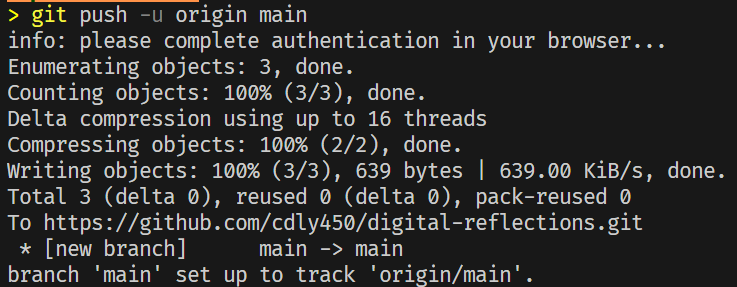
git push -u origin main
On the git push command, you will be prompted for your Github username and password. Sign in with your Github credentials.
Using GitHub Actions Workflow
To use a GitHub Actions workflow to publish the site use the following steps. Below is a visual representation of the logical steps that the GitHub Workflow follows.
Install the Github Actions VSCode Extension
The GitHub Actions extension lets you manage your workflows, view the workflow run history, and helps with authoring workflows.
More information can be found here: - GitHub Actions VSCode Extension
Install the GitHub CLI tool
Follow the instructions here to setup the CLI tool - GitHub CLI.
Setup GitHub Secrets
Configure secrets by using GitHub CLI. An example of how to do that can be found here - Setup GitHub Secrets
Required secrets:
AZURE_CREDENTIALS(service principal JSON forazure/login)GH_SWA_TOKEN(GitHub PAT with admin access to the repo, used during provisioning)CLOUDFLARE_API_TOKEN(Zone read + DNS edit)CLOUDFLARE_ZONE_ID
Cloudflare DNS (custom domain)
The workflow upserts a CNAME for www.digital-reflections.com pointing to the SWA default hostname and then waits for DNS propagation. The record must be DNS only (no proxy).
Setup GitHub SWA Token (for provisioning)
When using Bicep to deploy the Static Web App, Azure uses the repositoryToken to configure the GitHub integration during provisioning. This must be a GitHub PAT with admin access to the repo.
The deployment token for the SWA is fetched at runtime in the workflow, so it does not need to be stored as a GitHub secret.
- In the Bicep file, we specify the following parameters: -
param staticSiteObject = {
  sku: 'Free'
  name: 'digital-reflections'
  branch: 'main'
  repositoryUrl: 'https://github.com/cdly450/digital-reflections'
  repositoryToken: readEnvironmentVariable('GH_SWA_TOKEN')
  provider: 'GitHub'
  buildProperties: {
    appLocation: '/'
    appArtifactLocation: '/build'
    outputLocation: '/build'
    appBuildCommand: 'npm install && npm run build'
    skipGithubActionWorkflowGeneration: true
    githubActionSecretNameOverride: 'AZURE_STATIC_WEB_APPS_API_TOKEN'
  }
}
| Parameter | Description |
|---|---|
| Branch | This is the branch that will be used to publish the static website to the Static Web App. |
| Repository URL | This is the URL of the GitHub repository that contains the source code for the static website. |
| Repository Token | This is the GitHub Personal Access Token that will be used by the Azure Static Web app to authenticate to GitHub. This token is used during provisioning to configure the repo integration. It must have admin access to the repo. |
| Provider | This is the source control provider that will be used to publish the static website to the Static Web App. In this case, we are using GitHub. |
| buildProperties.appLocation | This is the location of the source code for the static website. In this case, the source code is located at the root of the repository. |
| buildProperties.outputLocation | This is the location of the build output for the static website. In this case, the build output is located in the build directory. |
Create a GitHub Actions Workflow File
- In the source code, create a
.github/workflowsdirectory in the root of the project. - Create a new file named
deploy.yml.
name: Azure Static Web Apps CI/CD

on:
  push:
    branches:
      - main
  pull_request:
    types: [opened, synchronize, reopened, closed]
    branches:
      - main
  workflow_dispatch:

concurrency:
  group: deploy-${{ github.ref }}
  cancel-in-progress: true

env:
  LOCATION: Australia East
  SWA_NAME: digital-reflections
  SWA_RESOURCE_GROUP: digital-reflections
  CUSTOM_DOMAIN: www.digital-reflections.com

jobs:
  changes:
    runs-on: ubuntu-latest
    outputs:
      infra: ${{ steps.filter.outputs.infra }}
      app: ${{ steps.filter.outputs.app }}
    steps:
      - uses: actions/checkout@v4
      - uses: dorny/paths-filter@v3
        id: filter
        with:
          filters: |
            infra:
              - 'infra/**'
            app:
              - '**'
              - '!infra/**'

  deploy_swa_job:
    needs: changes
    if: needs.changes.outputs.infra == 'true' || github.event_name == 'workflow_dispatch'
    runs-on: ubuntu-latest
    name: Deploy Static Web App Infrastructure
    permissions:
      contents: read
      id-token: write
    env:
      GH_SWA_TOKEN: ${{ secrets.GH_SWA_TOKEN }}

    steps:
      - name: Checkout repository
        uses: actions/checkout@v4

      - name: Azure login
        uses: azure/login@v2
        with:
          creds: ${{ secrets.AZURE_CREDENTIALS }}
          enable-AzPSSession: true
          auth-type: SERVICE_PRINCIPAL

      - name: Validate Bicep Template
        uses: azure/powershell@v2
        with:
          inlineScript: |
            $Inputs = @{
                Location = '${{ env.LOCATION }}'
                TemplateParameterFile = "${{ github.workspace }}/infra/parameters/main.bicepparam"
            }
            Write-Verbose "Invoke Test-AzDeployment with `n$($Inputs | ConvertTo-Json | Out-String)" -Verbose
            Test-AzSubscriptionDeployment @Inputs -Verbose
          azPSVersion: "latest"

      - name: Deploy Bicep Template
        id: deploy_bicep
        uses: azure/powershell@v2
        with:
          inlineScript: |
            $deploymentName = "swa-$env:GITHUB_RUN_ID"
            $Inputs = @{
                Location = '${{ env.LOCATION }}'
                TemplateParameterFile = "${{ github.workspace }}/infra/parameters/main.bicepparam"
            }
            Write-Verbose "Invoke New-AzDeployment with `n$($Inputs | ConvertTo-Json | Out-String)" -Verbose
            New-AzSubscriptionDeployment -Name $deploymentName @Inputs -Verbose | Out-Null
            $deploymentOutput = Get-AzSubscriptionDeployment -Name $deploymentName
            $staticSiteName = $deploymentOutput.Outputs.staticSiteName.value
            $staticSiteUrl = $deploymentOutput.Outputs.staticSiteUrl.value
            $staticSiteResourceGroupName = $deploymentOutput.Outputs.staticSiteResourceGroupName.value

            Add-Content -Path $env:GITHUB_ENV -Value "AZ_SWA_NAME=$staticSiteName"
            Add-Content -Path $env:GITHUB_ENV -Value "AZ_SWA_DEFAULTHOSTNAME=$staticSiteUrl"
            Add-Content -Path $env:GITHUB_ENV -Value "AZ_SWA_RESOURCEGROUPNAME=$staticSiteResourceGroupName"
          azPSVersion: "latest"

      - name: Resolve SWA default hostname
        if: github.event_name != 'pull_request'
        run: |
          hostname=$(az staticwebapp show \
            --name "${AZ_SWA_NAME}" \
            --resource-group "${AZ_SWA_RESOURCEGROUPNAME}" \
            --query defaultHostname \
            --output tsv)
          echo "AZ_SWA_DEFAULTHOSTNAME=${hostname}" >> "${GITHUB_ENV}"

      - name: Update Cloudflare CNAME
        if: github.event_name != 'pull_request'
        env:
          CF_API_TOKEN: ${{ secrets.CLOUDFLARE_API_TOKEN }}
          CF_ZONE_ID: ${{ secrets.CLOUDFLARE_ZONE_ID }}
          RECORD_NAME: ${{ env.CUSTOM_DOMAIN }}
          RECORD_CONTENT: ${{ env.AZ_SWA_DEFAULTHOSTNAME }}
        run: |
          ./scripts/cloudflare-upsert-cname.sh

      - name: Wait for DNS propagation
        if: github.event_name != 'pull_request'
        env:
          RECORD_NAME: ${{ env.CUSTOM_DOMAIN }}
          RECORD_CONTENT: ${{ env.AZ_SWA_DEFAULTHOSTNAME }}
        run: |
          target="${RECORD_CONTENT%.}"
          for i in {1..20}; do
            current=$(dig +short "${RECORD_NAME}" | head -n 1 | sed 's/\.$//')
            if [[ "${current}" == "${target}" ]]; then
              exit 0
            fi
            sleep 15
          done
          exit 1

      - name: Add custom domain to Static Web App
        if: github.event_name != 'pull_request'
        run: |
          az staticwebapp hostname set \
            --name "${AZ_SWA_NAME}" \
            --resource-group "${AZ_SWA_RESOURCEGROUPNAME}" \
            --hostname "${CUSTOM_DOMAIN}"

  build_and_deploy_job:
    if: >
      (github.event_name == 'push' || github.event_name == 'workflow_dispatch' ||
      (github.event_name == 'pull_request' && github.event.action != 'closed')) &&
      (needs.changes.outputs.app == 'true' || needs.changes.outputs.infra == 'true' || github.event_name == 'workflow_dispatch') &&
      (needs.deploy_swa_job.result == 'success' || needs.deploy_swa_job.result == 'skipped')
    needs: [changes, deploy_swa_job]
    runs-on: ubuntu-latest
    name: Build and Deploy Job
    env:
      SWA_NAME: ${{ needs.deploy_swa_job.outputs.staticSiteName || 'digital-reflections' }}
      SWA_RESOURCE_GROUP: ${{ needs.deploy_swa_job.outputs.staticSiteResourceGroupName || 'digital-reflections' }}
    steps:
      - uses: actions/checkout@v4
      - name: Set up Node.js
        uses: actions/setup-node@v4
        with:
          node-version: "18"
          cache: "npm"
      - name: Azure login
        uses: azure/login@v2
        with:
          creds: ${{ secrets.AZURE_CREDENTIALS }}
          enable-AzPSSession: true
          auth-type: SERVICE_PRINCIPAL
      - name: Get Deployment Token for Static Web App
        run: |
          api_key=$(az staticwebapp secrets list \
            --name "${SWA_NAME}" \
            --resource-group "${SWA_RESOURCE_GROUP}" \
            --query properties.apiKey \
            --output tsv)
          echo "AZ_SWA_DEPLOYMENT_TOKEN=${api_key}" >> "${GITHUB_ENV}"
      - name: Build And Deploy
        uses: Azure/static-web-apps-deploy@v1
        with:
          azure_static_web_apps_api_token: ${{ env.AZ_SWA_DEPLOYMENT_TOKEN }}
          repo_token: ${{ secrets.GH_SWA_TOKEN }}
          action: "upload"
Notes:
- The workflow fetches the SWA deployment token at runtime instead of storing it as a GitHub secret.
- Cloudflare DNS is updated in the workflow so the custom domain can be added after provisioning (DNS-only).
- The SWA hostname is read from deployment outputs after the infra step completes.
- Infra only runs when
infra/**changes; app deploy runs when non-infra paths change. - The Cloudflare DNS upsert lives in
scripts/cloudflare-upsert-cname.sh. - Concurrency cancels in-progress runs on the same branch.
- For the complete workflow, see
.github/workflows/deploy.yml.
Authenticating to Azure from GitHub Action
We use AZURE_CREDENTIALS (service principal JSON) for azure/login. If you switch to OIDC, configure a federated identity credential on the app.
Error: AADSTS70025: Client application has no configured federated identity credentials. Trace ID: abd45620-48ea-4c06-a7bd-302e98302e00 Correlation ID: 69480649-389a-4eaf-b6a1-468cb9e3a82b Timestamp: 2024-09-24 05:24:47Z
I needed to setup a federated identity credential for the service principal as documented here: - Configure a federated identity credential on an app.
Troubleshooting
SWA deployment token errors
Symptom: Cannot index into a null array or empty SWA token.
Cause: The SWA secret command didn't return a value.
Fix: Ensure the SWA exists and the workflow uses:
az staticwebapp secrets list \
  --name "${SWA_NAME}" \
  --resource-group "${SWA_RESOURCE_GROUP}" \
  --query properties.apiKey \
  --output tsv
Cloudflare authentication error
Symptom: code 10000 Authentication error from Cloudflare.
Cause: API token is invalid or missing permissions.
Fix: Recreate the token with:
- Zone → Zone → Read
- Zone → DNS → Edit
Scope it to the digital-reflections.com zone and update CLOUDFLARE_API_TOKEN.
Custom domain validation fails
Symptom: CNAME Record is invalid. Please ensure the CNAME record has been created.
Cause: DNS record missing or not propagated.
Fix: Ensure the CNAME exists and is DNS only (no proxy), then wait for propagation.
SWA default hostname is empty
Symptom: Cloudflare step fails with empty hostname.
Cause: Outputs not captured or SWA lookup failed.
Fix: Check AZ_SWA_NAME and AZ_SWA_RESOURCEGROUPNAME are set, then rerun:
az staticwebapp show \
  --name "${AZ_SWA_NAME}" \
  --resource-group "${AZ_SWA_RESOURCEGROUPNAME}" \
  --query defaultHostname \
  --output tsv