GitHub CLI
Links
| Link | Description |
|---|---|
| GitHub CLI Installation | Installation instructions for the GitHub CLI tool. |
Install GitHub CLI
Windows
gh is available via WinGet, scoop, Chocolatey, Conda, Webi, and as downloadable MSI.
WinGet
| Install: | Upgrade: |
|---|---|
winget install --id GitHub.cli | winget upgrade --id GitHub.cli |
The Windows installer modifies your PATH. When using Windows Terminal, you will need to open a new window for the changes to take effect. (Simply opening a new tab will not be sufficient.)
Check Installation
gh --version
Authenticate the GitHub CLI
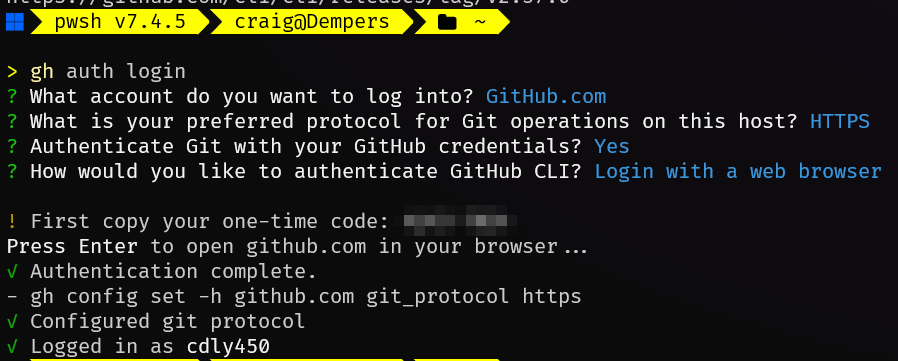
Once installed, you need to authenticate the GitHub CLI with your GitHub account. Run the following command and follow the prompts:
gh auth login
You can auth with either
HTTPSorSSH,HTTPSworked well for me.
Setup GitHub Secrets
Setting a secret
Use the gh secret set command to add secrets to your GitHub repository. For example: -
gh secret set GH_NAME -b "your-github-name"
gh secret set GH_EMAIL -b "your-github-email"
Setting a secret using json
To create a secret for use with the Azure Login GitHub Action you need to create a secret in a json format. As documented here: - Login With a Service Principal Secret.
gh secret set AZURE_CREDENTIALS --body '{ "clientSecret": "your-client-secret", "subscriptionId": "your-subscription-id", "tenantId": "your-tenant-id", "clientId": "your-client-id" }' --repo your-username/your-repo
or
cat > /tmp/azure-credentials.json <<'EOF'
{
  "clientId": "xxx",
  "clientSecret": "xxx",
  "subscriptionId": "xxx",
  "tenantId": "xxx"
}
EOF
gh secret set AZURE_CREDENTIALS \
  --repo cdly450/digital-reflections \
  --body "$(cat /tmp/azure-credentials.json)"
About GITHUB_TOKEN secret
GitHub provides a token that you can use to authenticate on behalf of GitHub Actions.
At the start of each workflow job, GitHub automatically creates a unique GITHUB_TOKEN secret to use in your workflow. You can use the GITHUB_TOKEN to authenticate in the workflow job.
More information can be found here: - Automatic token authentication.